Guide: How To Add a Manager to Your Google Analytics Account in 5 Easy Steps

3 minute read

Learn how to add a Manager to your Google Analytics account in 5 easy steps. Why would you want to add a manager to your Analytics account? Well, there could be many reasons from adding a colleague to allowing partners to help you track and read the available data.

Please note that this guide offer answers to basic questions. If you need help with advancing how your Google Analytics tracks actions on your website, feel free to reach out. We are always happy to help!

Add Google Analytics Manager in 5 Steps

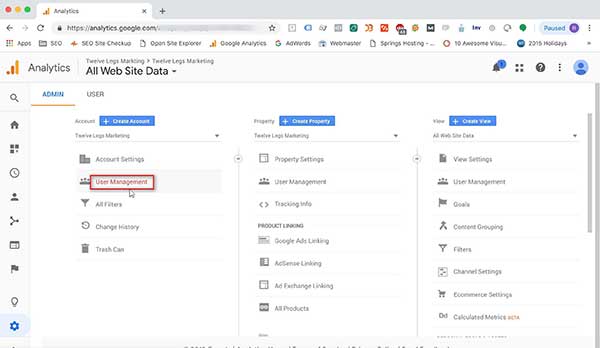
1. Start by logging into your Google Analytics account. Once there, please navigate to the bottom left and select the gear icon.

google-analytics-explainer-step-by-step

2. Next, select “User Management”.

google-analytics-explainer-step-by-step-next-step

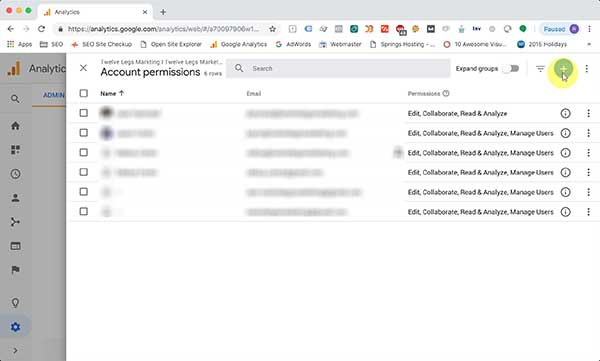
3. In the top right corner, select the “+” button, which will open a secondary menu.
google-analytics-explainer-step-account-performance

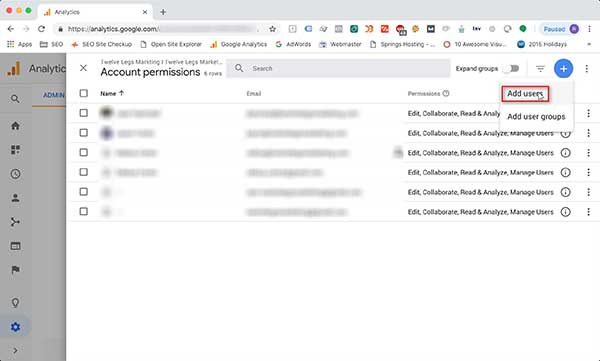
4. From the available options, select “Add users”.
google-analytics-explainer-step-account-performance-add-users

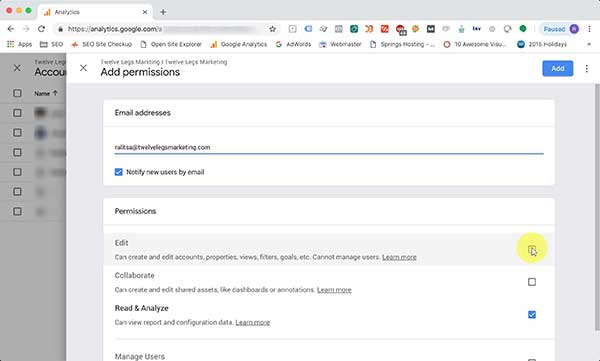
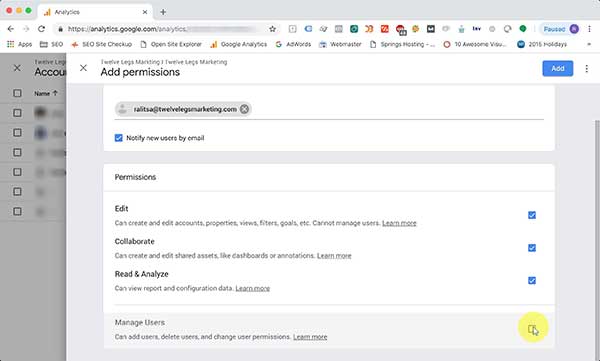
5. You need to add users who have Gmail accounts, either GSuite email accounts, which can be custom or addresses ending with “gmail.com”. Once the address is added, scroll down and review the options you have available. If you are adding a partner, you would most likely need to give them “Edit” access. If they should also be able to manage users, the very last option will have to be selected too.

Once all needed options are selected, don’t forget to click on “Add” in the top right corner. That will trigger an email to the new user, informing them that they now have access to your Google Analytics account.
google-analytics-explainer-step-account-performance-permissions google-analytics-explainer-step-account-performance-permissions-next-step

Related Posts

Why Your Event Rental Business Needs a Website You Actually Control

Your Website Should Be a Business Asset — Not Just a Marketing Tool Many event rental businesses treat their website like a digital brochure. A few photos, a list of services, and a contact form. But a well-built rental website can be much more than that. When your website is properly connected to your business […]

Best Practices for Rental Websites: A Comprehensive Guide

Introduction: The Essential Guide to Best Practices for Rental Websites A rental business website isn’t just a digital brochure—it’s a vital tool for attracting customers, streamlining operations, and ultimately driving revenue. Whether you run an event rental, equipment rental, or tool rental business, your website serves as the first impression for potential customers and an […]

Redefining Digital Excellence: A Case Study on Diamond Event & Tent

Our Partnership Begins When Diamond Event & Tent, a leading event rental company based in Salt Lake City, UT, realized their inefficient website was straining their business success, they concluded it was time for a change. Their digital presence was outdated, difficult to manage, and failed to reflect the true quality of their brand. The […]

Which Online Quote Request Option Is Best For You?